


Enclosed desktop laser for home creators
Precise custom work without exposed beams
Trusted by home creators


4.7 from 342 verified reviews
Carverall K15Pro Enclosed Laser Engraver
Directed diode and infrared laser thermal ablation turns digital designs into precise custom pieces, safely contained for your shared living space.
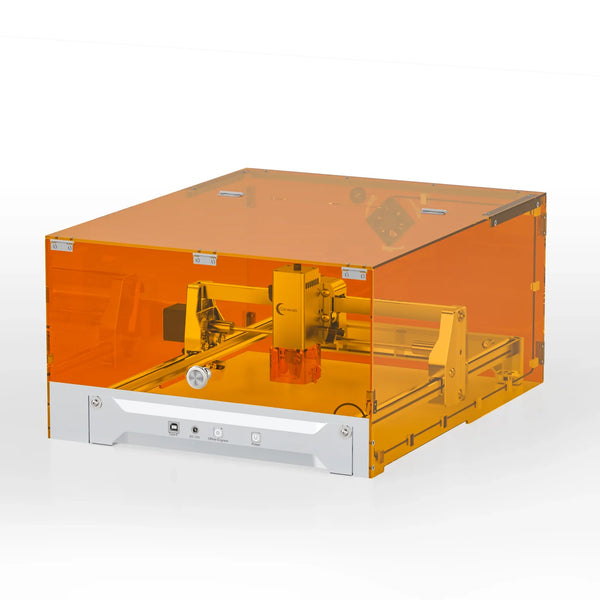
Enclosed protective shield
Fast, focused engraving
Phone and WiFi control
Clear setup guidance
A4-size creative workspace
Ready for repeat batches
Shield: No Shield
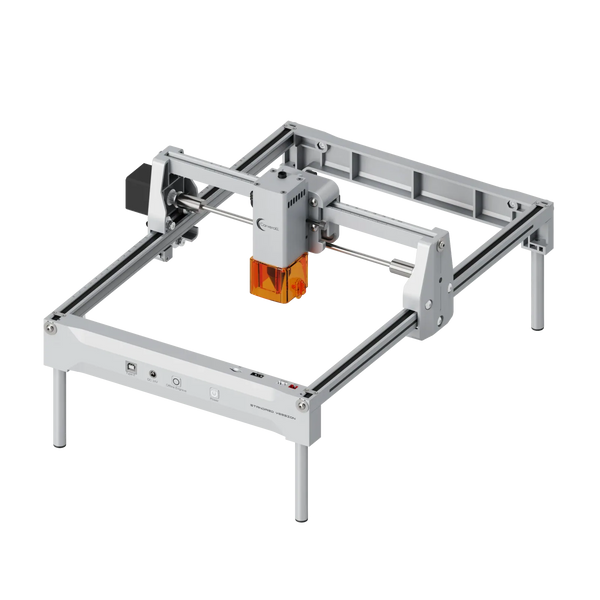
Power: 7W
Free shipping included
Safer home crafting
The enclosed shield helps contain the working beam in shared living spaces.
15,000
Maximum engraving speed in mm/min
3
Modular laser options to match your materials
300 × 200
Millimetres of A4-size engraving space
Built for calm, connected crafting
Enclosed orange shield
Adds a physical barrier around the working area.
Wireless phone control
Send designs through CutLabX over WiFi.
Emergency limit switches
Built-in protection helps contain machine operation.

Modular laser options
Choose 1W IR, 7W, or 12W diode capability.
A4-size work area
Create within a 300 × 200 mm engraving area.
Stable 32-bit GRBL control
Reliable control supports repeatable home production.
DESIGNED FOR YOUR DESKTOP
Know the fit before you start
Review the working area, controls, materials, and software compatibility at a glance.
Frame size
Approx. 432 × 295 mm
Engraving area
300 × 200 mm (A4 Size)
Maximum speed
15,000 mm/min
Laser options
1W IR / 7W / 12W Diode
Controller
32-bit MCU (GRBL-based)
Connectivity
USB and WiFi
Compatible software
CutLabX, LightBurn, LaserGRBL
Frame material
High-strength anodized aluminum

FROM BOX TO FIRST CUT
Start creating without the steep setup
Unbox the pre-assembled components and follow the included English instructions or video guide.
Connect through USB or WiFi, then place paper or basswood inside for a simple first test.
Choose a design in CutLabX, LightBurn, or LaserGRBL and send it to the machine.
Check the result, adjust your settings, and move from test pieces to repeatable custom orders.
Keep every session cleaner and clearer
Wipe down the interior shield and optical lens periodically to clear residue and smoke film.
Place the material inside the enclosed tray, choose your design, lower the lid, and watch the laser trace it.
Wood and other organic materials produce smoke and minor burning odors; use proper ventilation or an air purifier indoors.

A calmer upgrade for custom production
Move beyond slow hand tools and exposed-beam designs with an enclosed machine built for repeatable home projects.
Enclosed protective shield
Wireless phone control
Emergency limit switches
15,000 mm/min capability
1W IR / 7W / 12W options
32-bit GRBL control
A4-size engraving area
Free shipping
Open-frame alternatives
Manual carving tools
REAL HOME CREATORS
342 creators are making more at home
4.7
342 verified reviews
Setting this up took no time at all. I was cutting basswood and cardstock within twenty minutes of opening the box.
Mark S.
Verified buyer
Being able to send designs straight from my phone using the WiFi app makes quick projects so convenient.
Elena R.
Verified buyer
It cuts and engraves cleanly on wood and glass. Just make sure you use it in a well-ventilated area because wood smoke has a strong scent.
David K.
Verified buyer
The enclosed shield gives me a lot more peace of mind running it at home compared to open-frame models.
Jessica T.
Verified buyer
Fantastic entry-level machine for starting small crafts. The instructions were clear and everything worked right away.
Brian M.
Verified buyer
Tested it on coated metal lids and plywood with great results. Excellent value for an entry-level cutter.
Amanda L.
Verified buyer
MADE FOR THE NEXT ORDER


Clear answers before your first batch
Practical details on smoke, software, stability, and safer home operation.
Yes. Organic materials such as wood naturally produce smoke and minor burning odors during engraving. Proper ventilation or an air purifier is recommended indoors.
Use the enclosed shield as designed, follow the included safety guidance, and wear included safety gear as directed. Never treat the machine as fireproof or leave operation unsupervised.
Keep the machine on a stable table and use moderate speeds when needed. Its anodized aluminum frame is optimized for compact desktop use.
The machine supports CutLabX, LightBurn, and LaserGRBL, with a free mobile app for selecting and sending photos from your phone.
It supports wood, leather, acrylic, and metal projects, with the selected laser option matched to the material and intended work.
The 300 × 200 mm work area suits personalized gifts, signs, tags, and small-batch home business products.
Setup uses pre-assembled components, English instructions, and a video guide, so you can begin with simple paper or basswood tests.
Connect by USB or WiFi, then send designs from a compatible device through CutLabX or supported desktop software.
The machine is designed for hobby and small-scale home business work, not heavy commercial laser production.
Wipe the interior shield and optical lens periodically to remove residue and smoke film from engraving sessions.
The modular options include 1W IR, 7W, and 12W diode configurations, letting you choose the capability that fits your projects.
Keep the lid closed during operation, use proper ventilation indoors, and follow the included instructions and safety guidance.
Rated 4.7 by 342 verified buyers
Turn custom orders into a steadier home business
Create cleaner, repeatable pieces from your own space with an enclosed laser built for the next stage of your craft.